Flexkeeping provides an intuitive overview of your amenity management and enables quick, efficient entry of all consumed items.
How to review amenity consumption
You can access a detailed consumption overview directly through the Flexkeeping web app on your computer. The page allows you to review usage for a specific date or across a broader time period.
In the main left-side menu, select “Analytics” and then “Amenities.” Choose the preferred date range and click “Get data.” The system will display a full overview of amenity consumption for all rooms within the selected timeframe.
Amenities overview
Use the “Filter” option to refine the list further based on your criteria. The “Search” field allows you to quickly locate a specific room or amenity item.
The total quantity and value of consumed amenities are displayed on the right side for convenient reference.
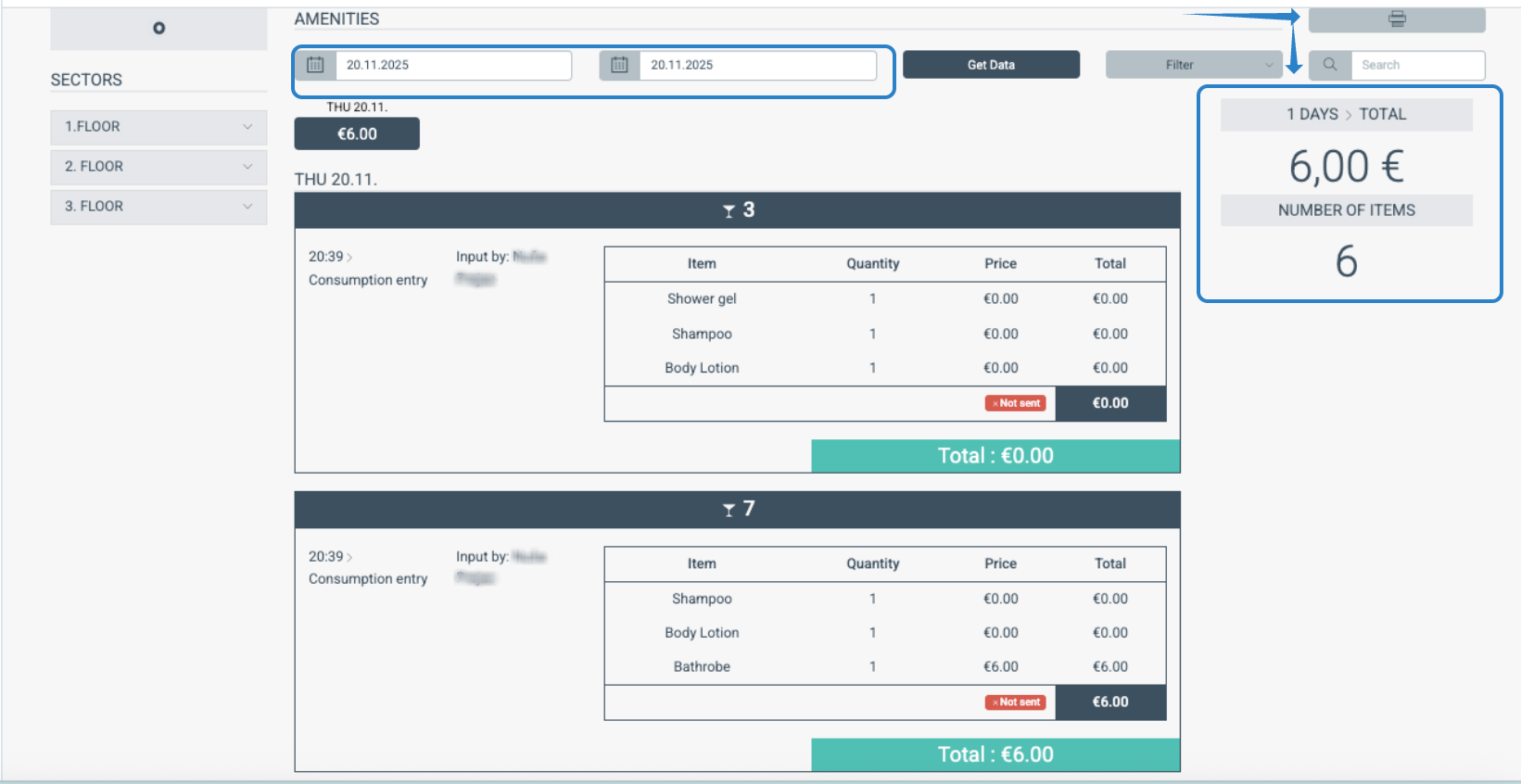
For reporting or documentation purposes, you can print or export the results by clicking the printer icon.
Was this article helpful?
That’s Great!
Thank you for your feedback
Sorry! We couldn't be helpful
Thank you for your feedback
Feedback sent
We appreciate your effort and will try to fix the article